Public beta: Advanced local LLM memory for Ally
Ally features a fully local LLM and chat experience similar to what’s offered by Ollama or Osauraus.
But, Ally is so much more than just a local LLM server and basic chat. It’s designed to learn about you over time so that it can be more helpful. Since all of this happens completely locally and privately, and no data is ever shared with anyone, ever, you don’t have to worry about some creepy company using what it learns to show you ads or leaking your data, etc.
Ally isn’t just doing basic RAG or semantic search. I’ve invested heavily into creating a sophisticated context system that allows Ally to not just recall, but understand the relationships between concepts and information. Multiple layers of context are added to help Ally understand not only what you’re working on at this very moment, but also how it fits into the bigger picture.
These two new memory features are two additional layers on top of Ally’s unique Shared Context feature.
Now, as you chat with Ally, it automatically stores key facts and information. This works very similar to the automatic memory features of ChatGPT and Claude.
As you work, your notes are automatically converted into vector embeddings so they can be searched. Then, your chats and notes are automatically processed into an evolving knowledge graph that stores how information is related.
All of this means Ally does more than just store and retain information, it understands your life by combining context from many sources.
How to turn on the advanced memory and context features beta:
Starting with macOS v1.3.3, if you go into Settings > AI and scroll below the list of LLMs, you’ll see a couple of new options to enable Ally’s advanced memory features:
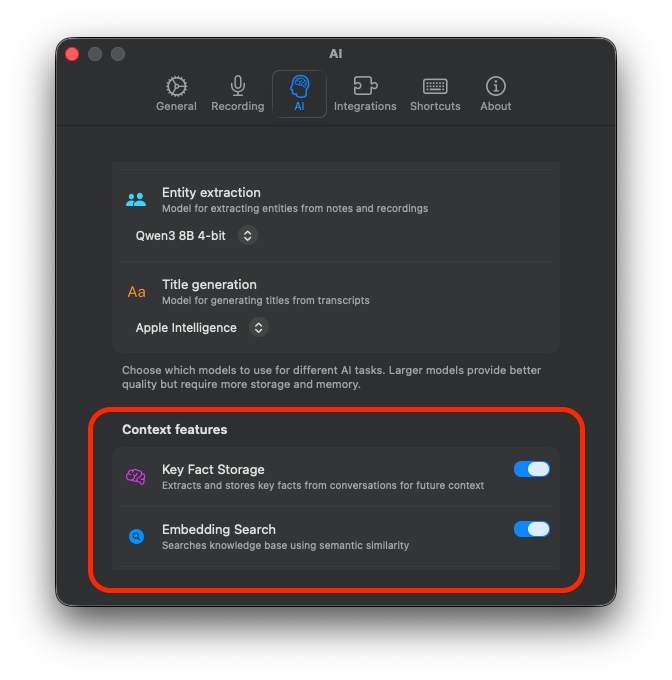
Please note that turning on memory features will slow response times. It takes additional time to search memories and it also takes additional time to load the additional context.